11Aug
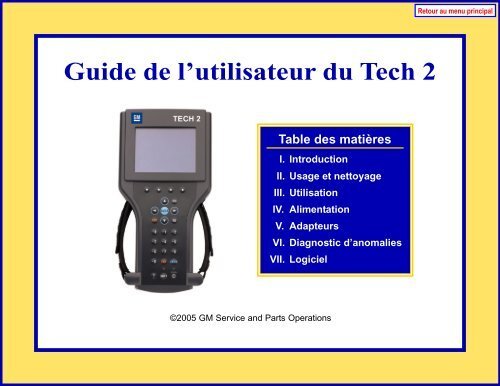
Free GM Software Download and Use GM Tech2
How to Use the GM Tech2 Clone Scanner
GM Tech2 scanner software version
For GM
- GM – English 33.004 1991-2014
- GM – Spanish 33.002 1991-2014
- GM – German 32.007 1991-2013
- GM – Japanese 32.006 1991-2013
- GM – French 32.007 1991-2013
- GM – Italian 32.007 1991-2013
- GM – Portuguese 32.002 1991-2013
- GM – Korean 32.002 1991-2013
- GM – Chinese 32.002 1991-2013
For OPEL
- OPEL – English Recent Update V180 1997-2014
- OPEL – Italian Recent Update V180 1997-2014
- OPEL – Polish Recent Update V180 1997-2014
- OPEL – German Recent Update V180 1997-2014
- OPEL – Turkish Recent Update V180 1997-2014
GM Tech2 Card Opel software can be updated to version V180 and supports cars from years 1997 to 2014.
GM Tech2 Scanner Features
- Authentique logiciel GM dans le Tech2 Flash, offrant le logiciel de diagnostic le plus complet disponible pour les véhicules GM de dernière génération.
- On-board diagnostic support on all GM systems from 1994 to present.
- Removable hardware modules to avoid diagnostic tool obsolescence.
- Large, easy-to-read backlit display.
- RS232 and RS485 ports for connecting future devices to Tech2 Flash.
- Ability to capture stored trouble codes, frozen snapshots and failure records for later analysis.
- Ability to view the status of currently running vehicle diagnostic tests.
- Complete bi-directional control with genuine GM software from 1992 to present for powertrain, chassis and body diagnostics.
To perform diagnostics on a vehicle using the CAN interface, you will need the Tech2 Flash and a CAN diagnostic interface module. Once the module is connected, it can be used on all GM vehicle applications, including those using other platforms such as OBD I and OBD II.
How to install TIS2000 software on any computer with any operating system (Windows, MAC, Linux)
Here is a link to detailed instructions for installing TIS2000 software on any computer and operating system.
Explanatory video:
Here is a video qui explique comment utiliser le scanner GM Tech2.
Other useful resources:

My name is Sofiane, I was born in Lyon in 1996. I grew up in a modest family and I have always been fascinated by cars since I was very young.
After my high school studies, I decided to specialize in the automotive field. So I went to study automotive engineering in Grenoble where I obtained a master's degree in mechanical engineering for passenger vehicles.
Passionate about OBD (On-Board Diagnostic) technology, which allows drivers to diagnose their car themselves using the elaborate system embedded in their vehicles connected via Bluetooth/Wi-Fi or USB with a compatible personal computer such as Windows PC/ Linux/MacOsX such as ELM327 WiFi), I started my professional career as a technical writer after having completed several practical internships with different Lyon automobile garages in order to deepen my technical knowledge for this sector and acquire sufficient practical experience necessary that could be useful when products software achievements.
Over the years, I had developed some additional passions in particular: travel, computing (IOT & IP Networks) and Jazz music. It is thus that thanks to these additional skills enriched during all his extra-professional adventures that he was able to establish a bridge between his professional and private life offering him more equally interesting and diversified professional opportunities
I like working on complex projects linked to this fairly cutting-edge technology (preventive maintenance, advanced engine error diagnostics) because it allows me to take on stimulating technical challenges which constantly improve my skills and my expertise in this sector.
As a technical editor for Bosch France, I often had the opportunity to participate in seminars organized by their partners, suppliers or internal distributors. Thus during a professional trip to China to attend a conference on new trends in the Chinese automotive market ( 2020)
After my high school studies, I decided to specialize in the automotive field. So I went to study automotive engineering in Grenoble where I obtained a master's degree in mechanical engineering for passenger vehicles.
Passionate about OBD (On-Board Diagnostic) technology, which allows drivers to diagnose their car themselves using the elaborate system embedded in their vehicles connected via Bluetooth/Wi-Fi or USB with a compatible personal computer such as Windows PC/ Linux/MacOsX such as ELM327 WiFi), I started my professional career as a technical writer after having completed several practical internships with different Lyon automobile garages in order to deepen my technical knowledge for this sector and acquire sufficient practical experience necessary that could be useful when products software achievements.
Over the years, I had developed some additional passions in particular: travel, computing (IOT & IP Networks) and Jazz music. It is thus that thanks to these additional skills enriched during all his extra-professional adventures that he was able to establish a bridge between his professional and private life offering him more equally interesting and diversified professional opportunities
I like working on complex projects linked to this fairly cutting-edge technology (preventive maintenance, advanced engine error diagnostics) because it allows me to take on stimulating technical challenges which constantly improve my skills and my expertise in this sector.
As a technical editor for Bosch France, I often had the opportunity to participate in seminars organized by their partners, suppliers or internal distributors. Thus during a professional trip to China to attend a conference on new trends in the Chinese automotive market ( 2020)
Latest posts by SB - OBD Diag (see all)
- Quelles sont les étapes pour optimiser la cartographie moteur de votre deux-roues ? - April 3, 2026
- Moteurs diesel 472 : caractéristiques et applications - January 12, 2026
- Top 3 des shampoings Tekalab pour un pré-lavage performant - July 5, 2025


Leave a Reply